Pages Menu
RssFacebook
Categories Menu

Posted by on Aug 27, 2008

Saint of the Day – St. Monica – August 27

Saint of the Day – St. Monica – August 27

St. Monica, mother of St. Augustine, was born in North Africa in 333 AD. She was raised a Christian but her parents arranged her marriage to a non-Christian. It was not a happy marriage for many years, but eventually both her husband and her mother-in-law became Christians as well.

Monica had three children, two boys and a girl. The oldest, Augustine, is the best known. He tells the tale in his Confessions of his nearly 20 year journey to faith. Monica struggled with his lack of faith, his lifestyle that included a mistress and child, his time as a supporter of Manichaeism and his travels. At one point she even drove him away from home, but invited him back after receiving a vision that reassured her that he would eventually turn out all right.

Monica followed Augustine from North Africa to Rome and Milan. When eventually he became a Christian, she believed that her prayers had been answered and she died not long afterward.

The story of St. Monica is one I find intriguing. As a mother I can understand her desire to share her faith with her children. I know my children, like hers, must find their own way to faith, building on what we their family and community have shared with them as children, but somehow making it their own. I’m not sure the idea of pursuing them across oceans to keep trying to bring them to faith is a good idea, at least not today. When all was said and done, it was St. Ambrose who reached Augustine and led him to faith.

It seems to me that as 21st Century Christians, we can take part of her example – that of praying unceasingly for our children. Then it’s important to remember that we are part of a much larger community, and trust the Holy Spirit to send the right person or circumstances to help them grow to an adult faith of their own.

When one time someone asked my father-in-law what the most difficult age in raising children was, in his experience, he replied, “Thirty-eight!” At that point they are grown up and making their own decisions. His input was not always requested or welcomed, and he didn’t always understand the world in which they lived and worked.

I’ve always thought he had a point. Mine aren’t that old yet, so I can’t say whether I agree with his opinion about the age, but I know that being a parent doesn’t end at age 18 or even 21. We continue to care deeply about our children and the choices they make. We remember the mistakes we made. We dream of what they can be and the wonderful things they can do if they choose. But we can’t live their lives for them. We can’t make their decisions for them. All we can do is pray with great hope for them and “be there” when they come for support, advice and loving care.

Although St. Monica is not generally presented as patroness of parents in general, I think she should be. All parents can benefit from her example of unceasing prayer. And we can hope and pray that, as in the case of Augustine, other members of the community will reach out to our children and help them as well as they grow to adult faith and participation in the mission of spreading the Good News.

Read More
Posted by on Aug 18, 2008

Saint of the Day – St. Jane Frances de Chantal

Saint of the Day – St. Jane Frances de Chantal

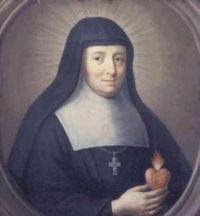
St. Jane Frances de Chantal was born in France in 1582, the daughter of the president of the Parliment of Burgundy. She married Baron de Chantal and had 6 children, three of whom died shortly after birth. She became a widow at the age of 28 as the result of a shooting accident. She was heart-broken and vowed never to marry again. She lived with her children in the home of her father-in-law for seven years before she was allowed to visit her father in 1604.

On that visit, she met St. Francis de Sales and he became her spiritual director. By 1610, in collaboration with Francis de Sales, she founded the Order of the Visitation of Holy Mary, for widows and lay women who were not called to such strict forms of religious life as were common at the time.

One description of the order states that its charism “combines gentleness with a valiant spirit; initiative with communal support; dedication to prayer with presence in the world; a contemplative life with an apostolic dimension. The order’s motto is “Vive Jésus” (French for “Live Jesus”).”

Visitationist sisters work with widows and women in poor health. They also have some schools. Their life includes a strong contemplative element.

One of St. Jane Frances de Chantal’s teachings to her sisters is as follows:

Fidelity toward God consists in being perfectly resigned to his holy will, in enduring everything that his goodness allows in our lives, and in carrying out all our duties, especially that of prayer, with love and for love. In prayer we must converse very familiarly with our Lord, concerning our little needs, telling him what they are, and remaining submissive to anything he may wish to do with us…

We should go to prayer with deep humility and an awareness of our nothingness. We must invoke the help of the Holy Spirit and that of our good angel, and then remain still in God’s presence, full of faith that he is more in us than we are in ourselves.

There is no danger if our prayer is without words or reflection because the good success of prayer depends neither on words nor on study. It depends upon the simple raising of our minds to God, and the more simple and stripped of feeling it is, the surer it is.

We must never dwell on our sins during prayer. Regarding our offenses, a simple humbling of our soul before God, without a thought of this offense or that, is enough…such thoughts act as distractions.

Saint Jeanne de Chantal, from Wings to the Lord

Read More

Posted by on Aug 15, 2008

Marian Theology: The Feast of the Assumption – August 15

Marian Theology: The Feast of the Assumption – August 15

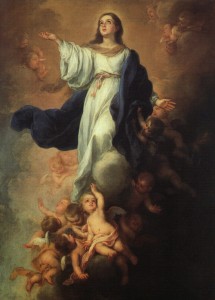
The Assumption by Murillo

The Assumption by Murillo

August 15th, the Feast of the Assumption, dates to the 6th and 7th centuries. The official proclamation of the Assumption by Pope Pius XII in Munificentisimus Deus as an article of faith for Catholics occurred recently, on November 1, 1950. Objections to this teaching cite the absence of support for it in Scripture and in the Fathers of the Church. These same arguments are also made against the doctrine of the Immaculate Conception, which states that Mary received the benefit of the redemption in advance from the moment of her conception. However, since the theological significance of Mary is intertwined with that of Christ, as mother and son, much of what we say about Mary (Mariology) derives from what we say about the identity and meaning of Christ (Christology).

For most Catholics, Orthodox, Coptics, and Anglicans, images and veneration of Mary, the Mother of Jesus, are part of the very fabric of their faith. This emotional and doctrinal emphasis on Miriam of Nazareth gives many in the Anabaptist and Calvinist traditions emotional and doctrinal heartburn. Some evangelicals are strident in their belief that Marian devotion – at best – detracts from the key act of salvation, which they formulate as “accepting Jesus as your personal Lord and Savior.”

The notion of salvation in the apostolic churches is centered on the church community. Christ’s death and resurrection has saved all and we enter into this paschal mystery embodied in the church. Our salvation is entering the faith community, the Body of Christ. From the earliest days, the Fathers of the Church identified Mary as the model of the Church. The following excerpt, taken from Wikipedia’s article on Roman Catholic Mariology, summarizes the position and importance of the Blessed Mother. Please note that the words in parentheses are my own.

Pope Benedict XVI addresses the issue, why Mariology is related to ecclesiology (the theology of the Church). On first sight, he argues, it may seem accidental, that the (Second Vatican) Council moved Mariology into ecclesiology. This relation helps to understand what “Church” really is. The theologian Hugo Rahner showed that Mariology was originally ecclesiology. The Church is like Mary.[96]

The Church is virgin and mother, she is immaculate and carries the burdens of history. She suffers and she is assumed into heaven. Slowly she learns, that Mary is her mirror, that she is a person in Mary. Mary on the other hand is not an isolated individual, who rests in herself. She is carrying the mystery of the Church.[97]

Pope Benedict XVI lamented that this unity of Church and Mary was overshadowed in later centuries, which overburdened Mary with privileges and removed her into a far away distance. Both Mariology and ecclesiology suffered under this. A Marian view of the Church and an ecclesiological view of Mary in salvation history lead directly to Christ. It brings to light what is meant by holiness and by God being human.[98]

It is interesting to note that Pope Benedict XVI laments the removal of Mary “overburdened … with privileges.” This is also the image of Mary lamented by the reformation. However, the close identification of Mary with the Church, in the sense that “Mary is carrying the mystery of the Church,” represents a notion of church that many of the reformers rejected. Consequently, they rejected the image and role of Mary, and with it, the redemptive grace and power of the feminine.

Read More

Posted by on Aug 14, 2008

Operation Kolbe – Continuing the Witness

Operation Kolbe – Continuing the Witness

The Kidnapped Colombia

– John Angée, artist


In preparation for the celebration of the feast of St. Maximilian Kolbe, Randy requested input from outside sources about Kolbe and his life. One of the responses came from a group in Colombia who offer themselves in exchange for persons kidnapped by rebels. This was their response.


El 14 de Agosto se recuerda y celebra la vida de Maximiliano KOLBE. Unidos a todos los secuestrados, Operación Kolbe, iniciativa de largo aliento, quiere renovar su ofrecimiento por la libertad.


Hemos expuesto un óleo titulado: “La Patria secuestrada” de John Angée (USA 2007) a la entrada del edificio Pedro Arrupe (Facultad de Teología) de la Pontificia Universidad Javeriana de Bogotá y seguimos alentando a Relevos, Orantes y Difusores para que se mantengan en la firme de decisión de acompañar solidariamente a tantos hombres y mujeres que siguen en cautiverio y a sus familiares y amigos.


No sabemos si algún día esta propuesta sea aceptada, pero sabemos, sí, que no descansaremos hasta ver en libertad al número desconocido de hermanos y hermanas que dramáticamente y en silencio nos piden no olvidarlos.

OPERACION KOLBE 2008
COLOMBIA

RESPONDER A:  operacionkolbe@hotmail.com

[On August 14 we remember and celebrate the life of Maximilian Kolbe. United with all those kidnapped, Operation Kolbe, a long term enterprise, wishes to renew its offer for liberty.

We have exhibited an oil painting titled: “The Kidnapped Colombia” by John Angée (USE 2007) at the entrance of the Pedro Arrupe building (Department of Theology) of the Pontificia Universidad Javeriana (Xavier Pontifical University) in Bogotá and we continue to encourage those who serve as Relief, those who Pray and Broadcasters to remain firm in their decision to accompany in solidarity the many men and women who remain in captivity and their family and friends.

We do not know if one day this offer will be accepted, but we know that, yes, we will not rest until we see the return to freedom of the unknown number of brothers and sisters who dramatically and in silence ask us not to forget them.

Operation KOLBE 2008

We can be reached at: operacionkolbe@hotmail.com

Translation by Kathy Pozos]

Thank you for your response. We will keep you and all kidnap victims and political prisoners in our prayers.

Read More

Posted by on Aug 14, 2008

Saint of the Day: St. Maximilian Kolbe – August 14

Saint of the Day: St. Maximilian Kolbe – August 14

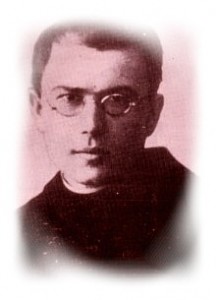
St. Maximilian Kolbe, a Conventual Franciscan, is widely known as the saint of the Nazi death camp Auschwitz, where he voluntered to take the place of a young husband and father who was one of ten innocent men condemned to death by starvation as a reprisal. As courageous as this was, he is also considered a martyr because of the abuse and torture he endured when he affirmed his faith in Christ.

Born Rajmund Kolbe (1894 – 1941), to a working class family in what is now Poland, he took the name of Maximilian when he entered the Conventual Franciscans. He had doctorates in philosophy and theology and founded a thriving monastery at Niepokalanow near Warsaw. St. Maximilian Kolbe was also a missionary to Japan and is remembered for his respect for Japanese culture and tradition as he created a thriving center near Nagasaki.

He lived a life of true Franciscan poverty, often living in very difficult circumstances, but always depending on God for the resources he needed for his apostolate. St. Maximilian Kolbe used publishing and radio to promote the Gospel and to defend the Church. He landed in Japan with a couple of companions and no money. They began their work sleeping on the ground in an improvised hut. Within a month he had a press and was publishing a weekly newspaper. He ventured into India where he wanted to create another foundation, but his superiors recalled him to Poland because of his ill health.

In 1939 the Nazis invaded Poland. St. Maximilian Kolbe and his fellow Franciscans sheltered 3,000 refugees at Niepokalanow including 2,000 Jews. On February 17, 1941 he was arrested by the Gestapo after publishing a defense of truth in the face of Nazi propaganda. In May he was transferred to Auschwitz, where he continued his ministry despite inhuman conditions and beatings. It was in late July that a prisoner from his cell block disappeared and he volunteered to take the place of one of the ten men selected to be executed as a reprisal for the missing prisoner. After three weeks of hunger and thirst, during which he encouraged the other men and led them in prayer, he was murdered by a lethal injection on August 14.

St. Maximilian Kolbe had a powerful effect on a young Polish man, Carol Wotyla, who as Pope John Paul II would declare him a saint.

St. Maximilian Kolbe has also inspired Operation Kolbe, a group in Colombia, to offer themselves in exchange for those who have been kidnapped by rebels. They can be reached at: operacionkolbe@hotmail.com.

Read More

Posted by on Aug 13, 2008

How can I sponsor Theologika.net?

How can I sponsor Theologika.net?

Theologika.net is an online resource offered at no charge to our users. Our goal is to support the catechetical and evangelization mission of the Church by providing a database of trustworthy, relevant, authoritative information for use in ministry or personal spiritual growth. Our dream is that in even the smallest, most isolated village in the world, if there is a computer that can reach the Internet, the collected thinking of the Christian church through the centuries, that has been indexed and organized through the Theologika database, will be available to the man, woman or child who wants to learn more about God and grow in faith. And in our own, highly developed, capitalistic countries of the world, the same resources will be available to those who seek the same knowledge and growth – regardless of ability to go out and buy a book or attend a class.

Just now, Theologika.net is in its infancy. It’s less than a year old, but already hundreds of items have been tagged, and we have users all around the world. The number of entries and Trustees entering materials is growing at a steady pace. Within a year, Theologika will have become a substantial resource for our Christian community. We’re even hoping to be able to move into languages beyond English soon.

So, how to fund the effort?

Theologika.net is not a charity. We can’t offer tax-deductiblity in return for charitable donations. We encourage you to donate to your parish, to the missions, to schools. However, we can’t ask for your donations.

What we can offer are sponsorship listings on our webpages, with our thanks. If you have a business, we’re happy to link to your website. Take the cost out of your advertising budget and it still may be deductible! (Check with your accountant, of course.)

If you’d like to help support the development of this resource for ministry, please contact us. We’ll be happy to talk with you about how you can help. We have a variety of options available and will be delighted to work with you to find the best fit. Just as the mighty redwood tree has its start from tiny seeds in tiny cones and/or can grow from the base of parent trees, so together we can grow a great resource for the Church from a tiny start.

Looking forward to hearing from you.

Read More

Posted by on Aug 12, 2008

Searching and Tagging Tips – More on how to use Theologika.net

Searching and Tagging Tips – More on how to use Theologika.net

NEWS FLASH!

Theologika.net will begin offering workshops and classes in collaboration with our trustees and other theologians, philosophers and social scientists in early 2011. As part of this new development, the ways you will search for information and create tags will change.

Check out these two posts for details about the upcoming changes and how to save your own personal directory materials.

2011 Brings Classes and Big Improvements to Theologika.net

We’re Moving: Time to Pack Up Your Data

More information about the changes will be posted on our blog at https://blog.theologika.net as they develop .

If you yourself have a website yourself, please put our site, www.theologika.net, into your links and recommendations.  We’ve even got a neat logo you can put with it if you’d like. You can copy it from the blog at https://blog.theologika.net/2008/06/20/your-own-directory-at-theologikanet/.

Read More

Posted by on Aug 11, 2008

Saint of the Day – St. Clare of Assisi – August 11

Saint of the Day – St. Clare of Assisi – August 11

St. Clare of Assisi was born in 1194. She was one of the early followers of St. Francis of Assisi and with him co-founded the Order of Saint Clare, now commonly known as the Poor Clares.

Clare was from a wealthy family and left it all to lead a life of absolute poverty in a cloistered monastery. She and her sisters passed their days working and praying. The order has continued into our times, with monasteries of sisters in communities around the world.

In celebration of the feast of St. Clare, I invited some of her sisters to share their insights and reflections. I received these responses.

From Sr. Miriam Varney, Abbess of the Monastery of St. Clare in Chesterfield, NJ,

Saint Clare had a great devotion to the Eucharist and it was shown at the time when the town of Assisi was being attacked.  Clare’s response was to go to Jesus in the Eucharist. Here is our prayer Novena for our Feast Day:

Saint Clare, radiant light, Shining in Splendor, help us all to walk, “with swift pace and light step” in the footprints of the “Poor Crucified and His Most Holy Mother.” Through Your presence in the Blessed Sacrament, Protect all life, our homes and cities from crime and violence as you once protected your sisters and the city of Assisi.
Through your powerful intercession obtain many graces for the Church, for each of us, for our Franciscan family and for the whole world. Amen

From the Poor Clare Nuns of Belleville:

13th century St. Clare stands as a 21st century witness of Gospel hope.  She is reminder that human fulfillment is not a matter of power or prestige or possessions, but of discovering the treasure that lies hidden in the field of the world (3rd Letter of St. Clare to St. Agnes of Prague).  Clare bears shining witness that the kingdom of God is within.   She shows the world that a life full of God is a life full of hope.   She confirms this telling observation of Pope Benedict XVI:  Prayer is the language of hope — not a hope which isolates or renders indifferent to the sufferings of the human family, but a hope that gives the individual a heart for the world and thus to all that makes the world truly worthy of its divine destiny.

Each Poor Clare community is called to be an “assembly of hope.”  Hidden and apart, universal and eschatological (Poor Clare Constitutions, art. 44,1), the more deeply, fervently and faithfully we live our enclosed contemplative form of life, the more do we bear witness to Christ, the Life and Hope of the world.  Ours is a life of joy and faith, surrender and self-sacrifice which enables our monasteries to continue to offer to today’s world, with its widespread need for spirituality and prayer, the demanding proposal of a complete and authentic experience of God, One and Triune, radiating His loving and saving Presence.  (Pope John Paul II)

For more information on our community, our Poor Clare vocation and for reflections on various Franciscan/Clarian themes, you are welcome to visit our website.

From Sister Jane Marie Delevan of St. Clare Monastery in Evansville.

We appreciate your efforts to make our Mother St. Clare better known and yes you are in our prayers, God Bless you, Sr. Jane Marie,O.S.C. Happy & Blessed Feast Day!!

And now, a quick trivia question. Why is St. Clare shown with a cat in the first image? The story goes that when she was confined to bed due to illness, she continued to work. One day she dropped the roll of fabric on which she was working and it rolled away out of her reach. The monastery cat brought the fabric back to her, so she could continue working.

One of the California missions, and indeed, an entire city, is named for St. Clare of Assisi. Mission Santa Clara de Asís is located near San Jose, California and was founded in 1777 by Fr. Junipero Serra. Fray Tomás de la Peña and Fray José Murguía were the first to minister at Santa Clara. Today Santa Clara University is located on the site of the mission and the restored mission church is the university chapel.


My thanks to the communities who have shared their thoughts with us and to all Sisters of Saint Clare, for your dedication to serve the Lord and the Christian community through your lives of prayer and sacrifice, as well as through the many types of work you do in service to the community. Happy Feast Day.

Read More

Posted by on Aug 9, 2008

Saint of the Day: St. Edith Stein – August 9

Saint of the Day: St. Edith Stein – August 9

Sr. Teresa Benedicta of the Cross, a Carmelite nun, was born Edith Stein in 1891in Poland and was killed in Auschwitz on August 9, 1942. Edith and her sister Rosa, along with other Jews who had become Catholics, were arrested by the Nazis occupying the Netherlands in retaliation for the denunciation by the Dutch bishops of Nazi anti-Semitism.

There has often been criticism of the silence of the Church with regard to the Nazi extermination of the Jews. Before he became Pope Pius XII, Cardinal Eugenio Pacelli had been the papal nuncio to Germany during the 1930’s and negotiated a treaty, or concordat, between the Vatican and Nazi Germany. Gerard Noel has published a new book, Pius XII: The Hound of Hitler, which focuses on the crushing conflict the Pope experienced within himself and the deep personal toll it took on him.

Pius XII’s fears for the Church were only increased by the Nazi extermination of Jewish converts to Catholicism in the Netherlands. A broader analysis of the Pope’s situation makes it seem almost impossible. Events were beyond the ability of any one person to change or control. Mary Doria Russell, in A Thread of Grace, portrays the complexity of the Italian resistance to the Holocaust. The sheer caprice of war annihilates and spares individuals and communities at random. Most Italian Jews were saved by their neighbors and complete strangers. Unfortunately, this was not the pattern in the rest of Europe.

St. Edith Stein could not justify the horrendous evil that was to be visited on her people in any theological sense but that of the cross. In her final few days at Auschwitz, Edith and her sister Rosa made an indelible impression on some of the children. As the survivors tell it, many mothers were so traumatized that they collapsed emotionally. Edith and Rosa comforted and held the children and did what they could to meet their needs. Edith Stein’s contribution to the philosophy of experience was the notion that our identity is created not through an Ego that apprehends others. Rather, the Ego arises out of our identification with the needs, desires, and feelings of others. We come to be, as self-conscious beings, through compassion.

In her final days, St. Teresa Benedicta of the Cross showed that her philosophy of compassion was not just an intellectual construct but the framework of her life and legacy to us.

Read More

Posted by on Aug 8, 2008

Saint of the Day – St. Dominic – August 8

Saint of the Day – St. Dominic – August 8

For the feast of St. Dominic, I asked several Dominicans what they would like people to know about the founder of their order, the Order of Preachers. These were responses I received in the order received.

From Timothy Radcliffe, OP, Blackfriars, Oxford: 

I would say that one of the things that struck people about St Dominic was his joy. One has the impression that he delighted in talking to people, whoever they were. He had an immediate empathy with people, with their sorrows and joys. It was said that he laughed during the day with his brethren, and wept at night with God. This joy is the beginning of all preaching. The early Dominicans all compared the gospel to new wine, which makes you drunk!

From Thomas McDermott, OP, Kenrick-Glennon Seminary, St. Louis, Missouri

Here’s something that you might be able to use:

“Two distinctive features of Dominican spirituality are study and preaching.  St. Dominic situated his religious communities not in the countryside, as in the case of monks, but in the center of university cities.  Manual labor was replaced by study and the friars could be dispensed from attending parts of the Liturgy of the Hours for purposes of study.  What were they to study?  Truth–sacred truth.  The motto of the Order is Veritas.  Study was to inform the contemplative life of the Dominican friar and preaching, in all its forms, was the overflow.  Another motto is, “To preach, and to share with others the fruits of one’s contemplation.”  The official name of Dominican order is the Order of Preachers.  Democracy has always been a hallmark of the Dominicans. Major and local superiors are elected by the friars themselves.  General chapters of the Order take place every three years to respond to current needs and keep the Order’s legislation up to date.”

Here’s a good source for biographies of St. Dominic and other OP saints, http://www.domcentral.org/trad/

From Michael Fones, OP, Co-director, Catherine of Siena Institute

I would want people to know that he was in such love with God that it was said of him that “he was always either talking to God or talking about God.”  I say this is a sign of his great love of God because we naturally want to be in conversation with our beloved, and he or she is always so much on our mind that we inevitably talk to others about them.

 From Sr. Barbara Long, OP, Holy Cross Parish, Santa Cruz

St. Dominic’s ministry is as contemporary today as it was in the 13th century. Dominic realized that we need to meet people where they are at. He didn’t wait for people to come to him, but encountered them in the every day activities of their lives and shared the Gospel message.

My thanks to these and other dedicated brothers and sisters of St. Dominic for sharing your gifts and insights.

Read More